

Odoo Customization: How to Start with Odoo 20?
A Practical Guide to Assessing Your Needs and Readiness Before Upgrading

The decision to customize and develop Odoo often starts when management realizes that the current system works, but doesn’t truly reflect the company’s real workflow. Data might be scattered across Excel files, WhatsApp messages, emails, and a separate accounting system; approvals may be slow, maintenance costs unclear, and the profitability of each client or project only becomes apparent after laborious manual effort. With the move to newer versions like Odoo 20, the key question arises: do we need customization? And what are the right steps before development? This guide, prepared by SFA Saudi Trading (SFA Saudi), explains this in a practical and straightforward way.
Who is this guide for?
This guide is not for one specific business. It is for anyone running a trade or a service: a fruit and vegetable shop, a grocery or supermarket, a large retail hall with several branches, a restaurant or café, a wholesale and distribution warehouse, a factory or workshop, a devices and maintenance company, or a services office. Details differ from one business to another, but the questions are the same: where does data get lost? How are decisions approved? And what does each customer and each product really cost? Every example in this article can be carried over easily to your own business.
| Business | What matters most in Odoo |
|---|---|
| Fruit & vegetable shop | Selling by weight, spoilage, today’s price |
| Grocery & supermarket | Barcodes, many items, promotions |
| Large retail hall with branches | Warehouses, shifts, stock counts, branch reports |
| Restaurant & café | Ingredients and dish cost |
| Wholesale & distribution | Credit, price lists, collection |
| Factory or workshop | Bills of materials and work orders |
| Devices & maintenance | Maintenance orders and spare parts |
| Services & offices | Appointments, recurring invoices, approvals |
What Does Odoo Customization and Development Mean?
Development doesn’t mean changing the system for the sake of change, nor does it mean building everything from scratch. The goal is to tailor Odoo to serve your company’s actual workflow: adding necessary fields, modifying forms, creating permissions, building reports, integrating with other platforms, or designing approval processes that fit your departments.
Successful customization maintains future upgradability. The more thoughtful and well-documented the changes, the easier and less complex it is to upgrade to a newer version like Odoo 20. That’s why it’s not recommended to turn every operational note into custom code; sometimes proper configuration, using a ready-made Odoo app, or a simple permission adjustment is enough.
When Does Your System Need Actual Development?
The need for development appears when the system becomes an obstacle to daily work, or when teams are forced to work around it using external methods. Key indicators include:
- Repeated data entry: Entering client data in sales, then re-entering it in maintenance or accounting.
- Reliance on external files: Such as a manual file to calculate maintenance contract profitability or technical visit costs.
- Lack of clear approvals: Purchase requests, discounts, or repairs handled through scattered messages that are hard to track.
- Difficulty knowing actual costs: Especially for companies with spare parts, technical visits, maintenance contracts, or multiple projects.
- Slow reporting: When a manager needs to gather data from several departments before making a decision.
- Manual integrations: Exporting and importing files between Odoo and an online store, shipping system, payment gateway, or attendance system.
If these symptoms repeat weekly, the problem isn’t just staff training; there’s likely a gap between the system’s design and the required workflow.
Customer and Vendor Registration: The Foundation of Operations
Any successful ERP project starts with the quality of customer and vendor data. In Odoo, it’s not enough to just record the client’s name; the company needs clear classification to help sales, accounting, and maintenance teams work without confusion.
Operational example: A company sells devices and provides after-sales maintenance. If a client has multiple branches, the system should clarify the billing address, delivery address, device location, responsible person, and payment or service terms. If a vendor supplies spare parts, inks, or devices, the system should display supply terms, contact details, and any classifications that help purchasing compare and follow up.
Customization here may require extra fields, such as client type, sector, device locations, or credit approval status. More importantly, there should be entry rules to prevent duplication and errors, such as standardizing name formats, linking branches to the parent company, and specifying who can create a new vendor.
Approvals: From Scattered Messages to a Clear Workflow
Approvals are one of the most telling areas of system weakness. The problem may start with a simple discount request, then expand to purchase orders, expenses, out-of-warranty repairs, or spare part approvals. When approvals happen outside the system, it’s hard to know who approved, when, and on what basis.
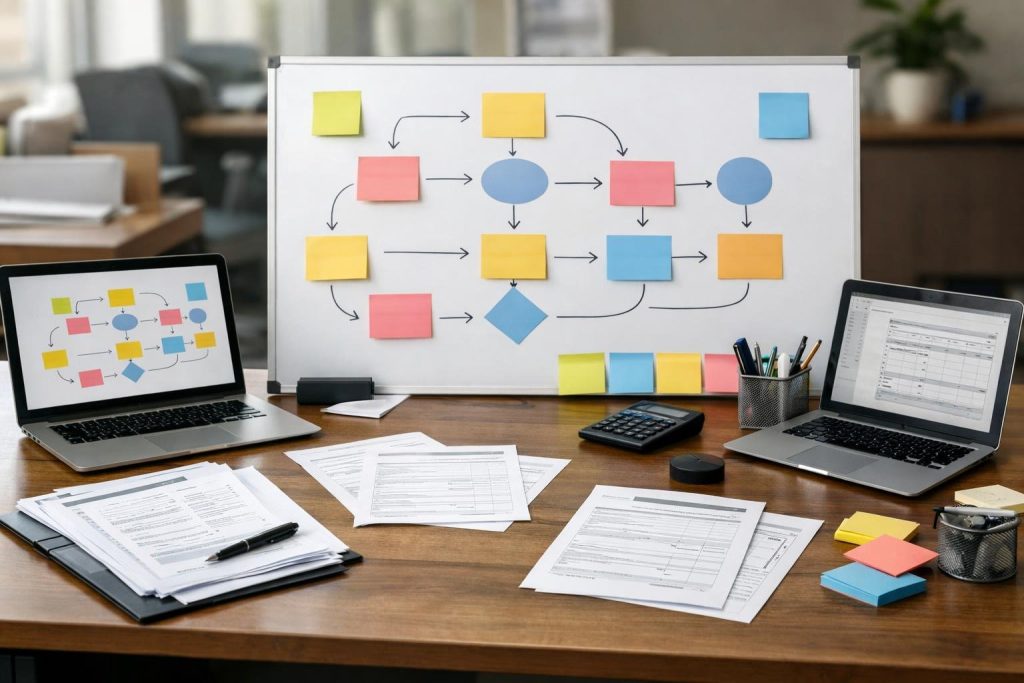
In Odoo, you can build approval workflows based on amount, request type, department, or employee level. Example: A spare part purchase request first goes to the maintenance manager to confirm technical need, then to purchasing to check vendor availability, then to management for approval if it exceeds an internal policy. This type of customization not only speeds up the process but also protects the company from incomplete or unjustified requests.
Approvals should be linked to sufficient data: client, work order, device, reason for request, expected cost, and required date. The clearer the request from the start, the fewer reviews and side communications needed.
Profitability and Costs: Don’t Settle for Total Sales
Many companies know their sales volume but don’t accurately know the profitability of each client, project, or contract. Odoo helps bring the picture together, but may require custom reports or linking operational costs to specific records.
Practical example: A maintenance contract for several devices may look good in terms of revenue but consumes frequent technical visits, spare parts, and trips. If these costs aren’t recorded against the contract itself, profitability will appear higher than reality. Odoo can be customized to link technician hours, spare parts, work orders, and expenses to a contract, project, or client.
It’s also important to separate cost types: purchase cost, shipping cost, installation cost, visit cost, repair cost, and alternative costs if any. The goal isn’t to complicate the system, but to enable management to see where they’re making money and where time and resources are being drained.
Maintenance and Repairs: Odoo in a Technical Service Environment
For companies that sell or service devices like printers, copiers, and plotters, maintenance management is more than just a support ticket. The process needs a device record, internal ID, location, warranty or contract status, previous visits, used parts, and technician notes.
Customizing Odoo can help create a workflow starting from the client’s report, then initial diagnosis, scheduling a visit, technician report, spare part request if needed, and closing the work order after client or manager approval. In workshops, you can add device receipt status, inspection, waiting for approval, under repair, ready for delivery, or closed.
Signs that development is needed in maintenance include: lost repair history, not knowing which parts were used for each device, difficulty measuring technician performance, or frequent calls to check the status of a report. Here, Odoo becomes a central operational platform instead of just a registration system.
Integrations: When Should You Connect Odoo to Other Systems?
Modern companies rarely run on a single system. You may need to connect Odoo with an online store, existing accounting system, payment gateway, shipping system, messaging platform, attendance system, or external warehouses. But integration should be based on a clear operational need, not just the desire to connect systems.
Before any integration, ask: What data will transfer? Which system is the source? Is the update one-way or two-way? What happens if synchronization fails? Who reviews errors? These questions reduce surprises and protect client, sales, and inventory data.
Example: If the online store sends orders to Odoo, you must define how the client, product, tax, payment status, and shipping status are created. If maintenance relies on an external ticketing system, you must specify when a ticket becomes a work order in Odoo and what mandatory data is needed before the technician starts.
Odoo 20 Compatibility Check Before You Start
Moving to Odoo 20 or building on it requires an organized review, especially if you have previous customizations. Don’t start by moving everything as-is; begin by evaluating what really needs to continue and what can be replaced with standard settings or apps.
- List used applications: Sales, purchasing, inventory, accounting, maintenance, projects, HR, etc.
- Document current customizations: Fields, reports, permissions, automations, integrations.
- Review data quality: Duplicate clients, inactive products, vendors, units of measure, inventory classifications.
- Test core processes: From quotation to invoice, from report to closing maintenance order, from purchase request to receipt.
- Analyze conflicts: Is there custom code that may not work in the new version? Are there undocumented add-ons?
- Set a migration plan: Test environment, acceptance scenarios, brief training, then gradual or full rollout depending on company size.
Good review won’t prevent all issues, but it exposes risks early and gives management a clearer view of the required time and effort.
The Role of AI in Odoo: Supporting Decisions, Not Replacing Staff
AI becomes useful when it is involved in specific steps whose output is reviewed by staff. It shouldn’t be a black box making automatic decisions in purchasing, maintenance, or accounting without supervision.
Practical examples of its use:
- Summarizing client reports: Turning long descriptions into clear points for the technician before the visit.
- Suggesting ticket classification: Such as routine maintenance, recurring fault, part request, or inquiry.
- Sales assistance: Drafting an initial response to a client inquiry based on order data, then reviewed by staff before sending.
- Operational alerts: Highlighting delayed maintenance orders or contracts with high costs compared to their history.
- Analyzing notes: Extracting recurring issues from technician reports or client comments.
The key is defining responsibility: AI suggests, summarizes, or prioritizes, while the staff member approves, edits, or rejects. This way, speed improves without sacrificing decision quality.
How to Start an Odoo Customization Project?
The right start isn’t writing a long wish list, but understanding the processes that cause delays, costs, or errors. Follow these steps:
- Set operational goals: Such as reducing repeated entry, streamlining approvals, or knowing maintenance contract profitability.
- Map current workflow: Who creates the request? Who reviews it? Where does the process stop? What data is needed?
- Classify requirements: Essential for operations, important for improvement, or can be postponed.
- Start with a prototype: Test the process on a sample of clients or work orders before full rollout.
- Test with users: Technician, accountant, sales rep, and supervisor; each sees different details.
- Document decisions: Why was the field added? Who has permission? When does the status change?
Every customization should have a clear reason, a responsible user, and an observable result. If you can’t explain the benefit of the customization in one sentence, it may need rethinking.
Common Mistakes to Avoid
- Automating chaos: Automating a disorganized process only makes the chaos faster.
- Too many fields: Excessive mandatory data can slow staff and lead to inaccurate entries.
- Ignoring permissions: Allowing everyone to edit weakens data quality and accountability.
- Neglecting training: The best customization fails if users don’t know when and why to use it.
- Not testing updates: Any change should be tested in a safe environment before going live.
Frequently Asked Questions
Does every company using Odoo need customization?
No. Some companies only need proper configuration and training. Customization is needed when there’s a clear gap between actual workflow and what the standard system offers.
Does customization make upgrading to Odoo 20 harder?
It can if it’s undocumented or done haphazardly. Well-planned and tested customization makes upgrading clearer and more manageable.
Which process should be developed first?
Start with the process that most affects revenue, cost, or customer satisfaction, such as approvals, maintenance orders, or linking costs to clients and projects.
Can AI be used without risk?
Risks can be minimized when AI’s role is supportive, not decisive, and when staff review results before approving or sending to clients.
Conclusion
Odoo customization and development isn’t just a technical project—it’s an operational decision that affects sales, purchasing, maintenance, accounting, and customer service. Start with core data, streamline approvals, link costs to operations, check compatibility with Odoo 20, and use AI in specific steps reviewed by staff. If you’d like to assess your company’s needs or see a practical scenario tailored to your business, you can request an online demo from the SFA Saudi Trading team to discuss requirements and determine the best starting point.
Whether your business is a vegetable shop, a large hall, a services company or something else, the principle is the same: start with the process that hurts most, customize only what’s necessary, and pilot in one branch or department before rolling out.
Want to see this on your own system? Read about our Odoo development and customization service or book an online demo with the SFA Saudi team.